
Inference Endpoints (dedicated) documentation
vLLM
vLLM
vLLM is a high-performance, memory-efficient inference engine for open-source LLMs. It delivers efficient scheduling, KV-cache handling, batching, and decoding—all wrapped in a production-ready server. For most use cases, TGI, vLLM, and SGLang will be equivalently good options.
Core features:
- PagedAttention for memory efficiency
- Continuous batching
- Optimized CUDA/HIP execution
- Speculative decoding & chunked prefill
- Multi-backend and hardware support: Runs across NVIDIA, AMD, and AWS Neuron to name a few
Configuration
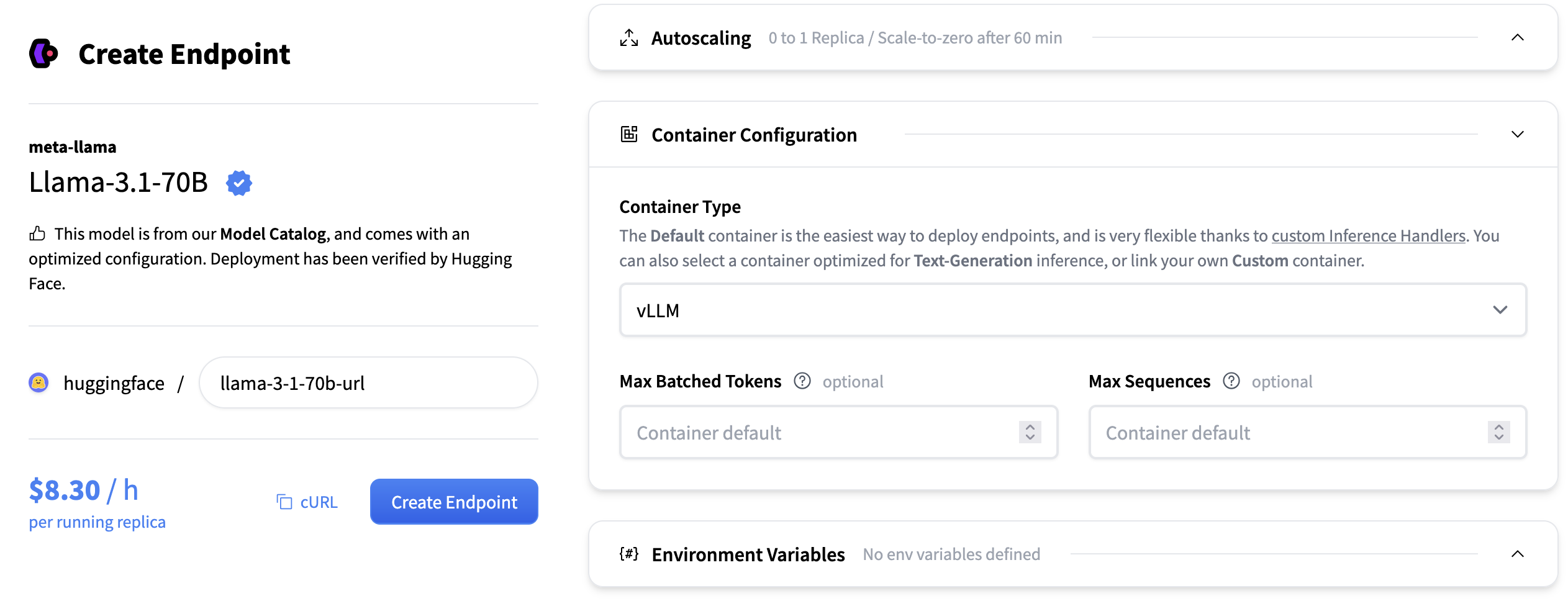
- Max Number of Sequences: The maximum number of sequences (requests) that can be processed together in a single batch. Controls the batch size by sequence count, affecting throughput and memory usage. For example, if max_num_seqs=8, up to 8 different prompts can be handled at once, regardless of their individual lengths, as long as the total token count also fits within the Max Number of Batched Tokens.
- Max Number of Batched Tokens: The maximum total number of tokens (summed across all sequences) that can be processed in a single batch. Limits batch size by token count, balancing throughput and GPU memory allocation.
- Tensor Parallel Size: The number of GPUs across which model weights are split within each layer. Increasing this allows larger models to run and frees up GPU memory for KV cache, but may introduce synchronization overhead.
- KV Cache DType: the data type used for storing the key-value cache during generation. Options include “auto”, “fp8”, “fp8_e5m2”, and “fp8_e4m3”. Using lower precision types can reduce memory usage but may slightly impact generation quality.
For more advanced configuration you can pass any of the Engine Arguments that vLLM supports
as container arguments. For example changing the enable_lora to true would look like this:

Supported models
vLLM has wide support for large language models and embedding models. We recommend reading the supported models section in the vLLM documentation for a full list.
vLLM also supports model implementations that are available in Transformers. Currently not all models work but support is planned for most decoder language models are supported, and vision language models.
Parallelism and Scaling
vLLM supports several parallelism strategies for distributed inference. The two most common ones are Tensor Parallelism (TP) and Data Parallelism (DP). Understanding when and how to use each is essential for optimal performance.
Default Behavior on Inference Endpoints
When you create an endpoint, after you’ve selected an instance type (e.g., 4 × A10G, 8 × H100). The defaults are:
tensor_parallel_size= number of GPUs on the instance (shards the model across all GPUs)data_parallel_size= 1 (single copy of the model)
This default configuration prioritizes fitting larger models by using all available GPU memory. However, you might want to tweak these settings if your model fits on fewer GPUs than your instance has and you want higher throughput by running multiple copies of the model.
Tensor Parallelism (TP)
Tensor parallelism splits the model’s weights across multiple GPUs within each layer. Each GPU holds a slice of the model and computes its portion of the output, then synchronizes with other GPUs.
When to use: Your model is too large to fit on a single GPU. You must set tensor_parallel_size to at least the number of GPUs required to hold the model in memory.
Example:
- Llama 3 8B (FP16) requires ~16GB → fits on 1 GPU →
tensor_parallel_size=1 - Llama 3 70B (FP16) requires ~140GB → needs 2 × 80GB GPUs →
tensor_parallel_size=2 - Llama 3.1 405B (FP16) requires ~810GB → needs 8 × 80GB GPUs →
tensor_parallel_size=8
Data Parallelism (DP)
Data parallelism runs multiple independent copies of the model on different GPUs. Each copy handles different requests independently, increasing throughput.
When to use: You want higher throughput and your model fits on fewer GPUs than your instance provides.
Configuration: Set data_parallel_size to the number of copies you want.
Combining TP and DP
On multi-GPU instances, you can combine both strategies. The key formula is tensor_parallel_size × data_parallel_size = total GPUs on instance.
Optimizing for Throughput
If your model fits on a single GPU but you want high throughput, lower TP and increase DP to run multiple copies of the model.
Example: Serving Llama 3 8B (~16GB) on a 4 × A100 80GB instance:
| Configuration | TP | DP | Copies | Behavior |
|---|---|---|---|---|
| Default | 4 | 1 | 1 | Model sharded across all 4 GPUs |
| Balanced | 2 | 2 | 2 | 2 copies, each sharded across 2 GPUs |
| Max throughput | 1 | 4 | 4 | 4 independent copies |
There’s always a trade-off:
- Higher DP (more copies) → higher throughput, but each copy has less memory for KV cache (shorter context)
- Higher TP (fewer copies) → more memory per copy for KV cache (longer context), but lower throughput
For example, tensor_parallel_size=2 and data_parallel_size=2 gives you 2 copies that can each handle longer contexts than the max throughput configuration, while still doubling your request capacity compared to the default.
Choosing the Right Configuration
- Calculate minimum TP: How many GPUs are needed to fit your model in memory?
- Set TP to that minimum
- Set DP = (total instance GPUs) ÷ TP
Example: You want to deploy Llama 3 70B on 8 × H100 80GB.
- Model needs ~140GB → minimum 2 × 80GB GPUs →
tensor_parallel_size=2 - Instance has 8 GPUs →
data_parallel_size=8÷2=4 - Result: 4 copies, each on 2 GPUs
Common Mistakes
| Configuration | Problem | Solution |
|---|---|---|
| TP=1, DP=1 for 7B on 4 × A10G | 3 GPUs sitting idle | Increase data_parallel_size=4 |
| TP=1 for 70B on single 80GB GPU | Out of memory | Use an instance with at least 2 × 80GB GPU and make sure tensor_parallel_size=2 |
| TP=2, DP=4 on 4 × A10G | Fails since 2 × 4 = 8 GPUs required, but only 4 available | Reduce to TP=2, DP=2 or TP=1, DP=4 |
| TP=3, DP=1 on 4 × A10G | 1 GPU sits completely idle | Use TP=4 or TP=2 with DP=2 |
References
We also recommend reading the vLLM documentation for more in-depth information.
Update on GitHub